Documentation
Cluster Documentation
A structured entry point for information that belongs to the cluster rather than a single node.
Overview
Cluster monitoring provides a unified Home Assistant view of a Proxmox VE cluster.
While PVE monitoring focuses on individual nodes and selected workloads, Cluster monitoring combines information from across the Proxmox environment so that the overall state of the cluster can be understood without treating each node as an isolated server.
This includes cluster status and quorum, node availability, aggregated resources, workloads, High Availability, failed tasks, firewall state, replication and backup health.
What Cluster monitoring covers
A configured Cluster connection can provide information from several areas:
- Cluster status and quorum — whether the cluster currently has quorum and how many nodes are online or offline.
- Resources — aggregated CPU, memory and storage information across the cluster.
- Workloads — cluster-wide visibility into running virtual machines and containers.
- High Availability — information about the Proxmox HA environment when HA is configured.
- Tasks and diagnostics — failed-task information and supported cluster diagnostics such as firewall state.
- Replication — summary and status information for configured Proxmox replication jobs.
- Backup monitoring — configured backup jobs, backup age and an overall backup-health view.
Cluster monitoring is designed to complement PVE monitoring rather than replace it.
Cluster and PVE provide different views
PVE monitoring answers questions about a particular node or workload:
- What is the CPU usage of this node?
- What temperature is this host reporting?
- What is the state of this VM?
- How much storage is available on this PVE resource?
Cluster monitoring answers broader questions:
- Does the cluster have quorum?
- How many nodes are online?
- How much CPU or memory is being used across the cluster?
- How many VMs and containers are running?
- Is High Availability active?
- Have cluster tasks failed?
- Is replication healthy?
- Are expected backups being created?
Both views can be useful at the same time.
A cluster is more than a collection of nodes
The most useful cluster information often comes from relationships between resources.
A single node being offline, for example, has a different operational meaning depending on whether the remaining cluster still has quorum, whether HA is configured and where the affected workloads are running.
For this reason, Cluster monitoring should be interpreted as a view of the Proxmox environment as a whole rather than simply as another set of node sensors.
Home Assistant organization
Cluster information is represented through a dedicated Home Assistant cluster device and related entities.
This keeps cluster-wide information separate from the devices representing individual PVE nodes, VMs, containers and storage resources.
You do not need to display every cluster entity.
A compact cluster overview containing quorum, nodes, resources, HA, failed tasks, replication and backup health can often provide more useful operational information than displaying every available value simultaneously.
Where to continue
The following sections explain the main areas of Cluster monitoring:
↑ Back to topQuorum & Nodes
Quorum is one of the most important health indicators in a Proxmox VE cluster.
Proxmox Extended Sensors exposes cluster status together with node availability so Home Assistant can provide a simple view of whether the cluster is currently able to operate with quorum.
Cluster status
The main cluster status represents whether the Proxmox cluster is currently quorate or has no quorum.
This provides a high-level health indicator for dashboards and automations.
A quorate cluster has the required voting majority according to its current Proxmox configuration.
A cluster without quorum requires attention because some cluster operations may be restricted or unavailable until quorum is restored.

Nodes online
Cluster monitoring also provides a summary of the nodes currently online.
The information can include:
- total number of nodes;
- number of online nodes;
- number of offline nodes;
- which nodes are currently online;
- which nodes are currently offline.
This allows Home Assistant to distinguish between the overall quorum state and the availability of individual cluster members.
Quorum and node availability are related but different
An offline node does not automatically mean that the cluster has lost quorum.
Likewise, the operational importance of an offline node depends on the size and voting configuration of the cluster.
For this reason, node availability and quorum should be read together.
A useful cluster dashboard can show both values prominently:
Is the cluster quorate?
and:
Are all expected nodes online?
These answer different questions.
Use quorum as a high-value signal
Unlike rapidly changing CPU or network metrics, quorum normally represents a condition that deserves immediate attention when it changes unexpectedly.
This makes it particularly useful for Home Assistant notifications.
Automations should still be designed carefully to avoid unnecessary repeated notifications during planned maintenance or intentional node shutdowns.
For the complete list of Cluster status and node entities, see Reference.
↑ Back to topResources
Cluster resource monitoring combines information from multiple Proxmox nodes to provide an overall view of how the cluster is being used.
This is useful for understanding capacity and workload distribution without replacing the detailed per-node information available through PVE monitoring.
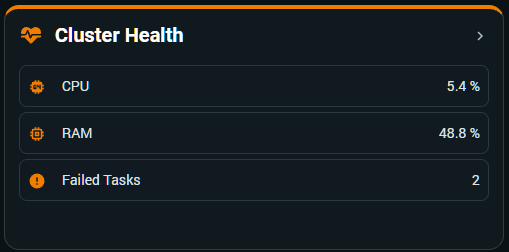
Cluster CPU usage
The cluster CPU sensor represents aggregated processor usage across the online cluster nodes.
Instead of treating each node percentage equally, the calculation takes the available CPU capacity of the nodes into account.
This produces a cluster-wide utilization value that better represents the processor resources currently being consumed.
Per-node CPU information remains useful for identifying where the workload is located, while the cluster value answers a different question:
How much of the cluster’s available CPU capacity is currently being used?
Cluster memory usage
Cluster memory monitoring combines the memory used and available across the online nodes.
This provides an overall RAM utilization percentage together with useful capacity context.
Per-node information remains important because a cluster can have significant free memory overall while one particular node is under memory pressure.
The aggregate value should therefore be used as a cluster-capacity indicator rather than as a replacement for node monitoring.
Workloads contribute to resource usage
CPU and memory utilization should be interpreted together with the workloads currently running in the cluster.
A change in cluster resource usage may be expected after:
- starting or stopping guests;
- migrating workloads;
- maintenance operations;
- changing workload demand.
The aggregate view provides context while PVE and guest monitoring provide the detail needed to identify the source.
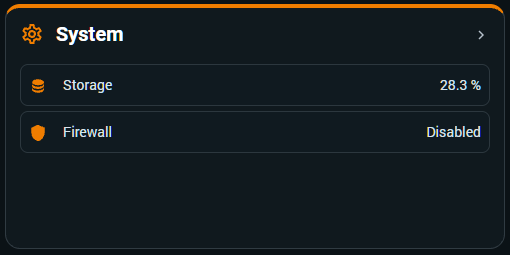
Cluster storage usage
Cluster monitoring can also provide an aggregated view of the storage resources reported through the cluster.
This can include overall used and total capacity together with information about the storage resources contributing to that value.
As with other aggregate metrics, the cluster percentage should not replace monitoring of individual storage resources.
A cluster may have substantial total free capacity while one important storage resource is approaching its own limit.
Aggregated information needs context
Cluster-wide percentages are intentionally summaries.
They are useful for dashboards, trends and high-level alerts, but they should not be treated as proof that every node or storage resource is healthy.
A good monitoring strategy uses the cluster view to identify that something deserves attention and the corresponding PVE information to understand where it is happening.
For the complete list of Cluster resource entities, see Reference.
↑ Back to topGuests
Cluster monitoring provides a high-level view of virtual machines and LXC containers across the complete Proxmox cluster.
This complements the detailed guest monitoring available through PVE connections.
Virtual machines
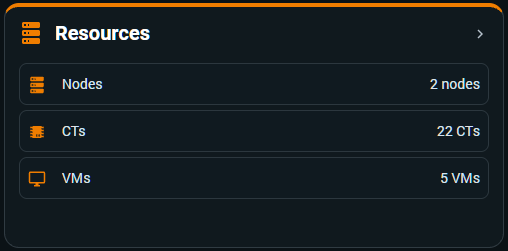
The cluster VM information summarizes the virtual machines known to the cluster and how many are currently running.
Additional information can identify the running workloads together with their VMID and current node.
This provides a quick operational view of the virtual-machine population without requiring every guest to be displayed individually.
Containers
LXC containers are summarized separately from virtual machines.
The cluster CT information can provide:
- total containers;
- running containers;
- stopped containers;
- information about the running containers and their current nodes.
Keeping VMs and containers separate makes the cluster overview easier to understand while preserving the distinction between the two Proxmox workload types.
Guests can move between nodes
One of the fundamental characteristics of a Proxmox cluster is that workloads are not permanently tied to one node.
A VM or container can migrate while remaining the same logical workload.
Cluster monitoring reflects the current cluster state and can show which node currently hosts a running guest.
For detailed monitoring of an individual selected VM or container, Proxmox Extended Sensors V5 is designed to preserve the guest’s Home Assistant identity when it migrates between nodes within the configured cluster.
This allows dashboards, history and automations associated with that monitored guest to remain attached to the workload rather than to its previous node.
Cluster guest counts and selected guest monitoring are different
The cluster summary can know about workloads across the cluster even when those workloads have not all been selected for detailed Home Assistant monitoring.
This distinction is intentional.
Cluster guest information provides an operational summary of the environment.
PVE guest selection determines which individual VMs and containers receive detailed Home Assistant entities.
You therefore do not need to monitor every guest individually simply to obtain a useful cluster-wide workload overview.
Use both levels where useful
A cluster dashboard might show:
- total/running VMs;
- total/running containers;
- cluster CPU;
- cluster RAM.
Detailed cards or automations can then focus only on the particular guests that matter to your Home Assistant environment.
This keeps the cluster overview useful without creating unnecessary entity noise.
For detailed VM and CT monitoring, see PVE → VM & CT monitoring.
For the complete list of Cluster guest entities, see Reference.
↑ Back to topHigh Availability
Proxmox High Availability can protect selected workloads by coordinating their availability across cluster nodes.
When HA information is available, Proxmox Extended Sensors exposes a cluster-level view that can be used in Home Assistant.
HA status
The cluster HA sensor provides a high-level indication of the HA environment.
When the required HA information is available and quorum is healthy, the cluster can report HA as active.
If the required information is unavailable or quorum is not healthy, the reported state can reflect that condition.
This makes HA status useful as part of the broader cluster-health picture.
Quorum matters to HA
High Availability depends on the state of the cluster.
For that reason, HA status should not be interpreted independently from quorum.
If the cluster loses quorum, the HA environment cannot simply be treated as healthy because individual nodes remain reachable.
Display quorum and HA together when they are operationally important to your environment.
Master and HA resources
Where Proxmox provides the information, HA monitoring can include additional context such as the current HA master and HA-managed resources.
This helps explain the state reported by the cluster without requiring Home Assistant to reproduce the complete Proxmox HA interface.
HA is optional
Not every Proxmox cluster uses High Availability.
If HA is not configured in Proxmox, the absence of meaningful HA resource information does not indicate a problem with the integration.
Cluster monitoring remains useful for quorum, nodes, resources, workloads, tasks, replication and backups without HA.
Home Assistant does not configure Proxmox HA
Proxmox Extended Sensors monitors the HA information exposed by Proxmox.
It does not replace the Proxmox HA configuration or decide which workloads should be HA-managed.
HA groups, resources, policies and operational decisions remain configured in Proxmox VE.
Home Assistant should be treated as an additional monitoring and automation layer around that environment.
For the complete list of HA-related Cluster entities, see Reference.
↑ Back to topTasks & Diagnostics
Cluster monitoring includes operational signals that can help identify problems without continuously reviewing the Proxmox task history.
Particularly useful areas include failed tasks, replication state and cluster firewall information.
Failed tasks
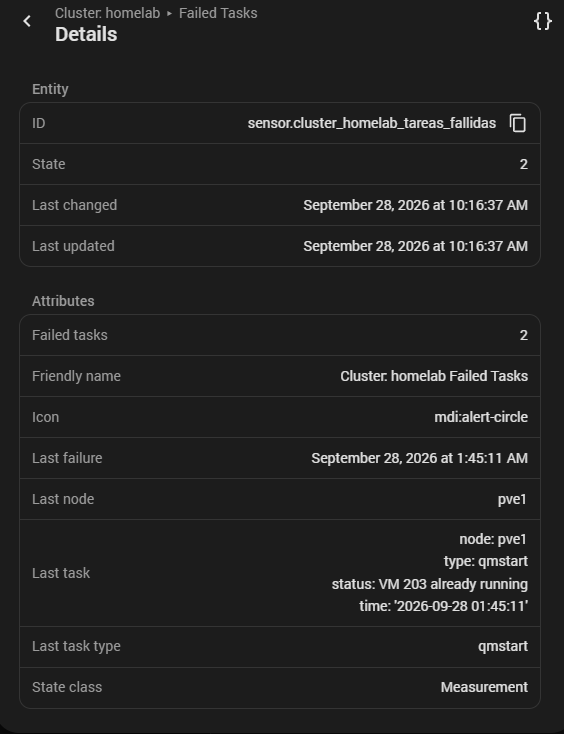
The Failed Tasks entity provides a cluster-wide view of recent Proxmox operations that did not complete successfully.
Its entity state acts as the high-level counter.
A non-zero value is therefore a signal that something in the recent cluster activity deserves investigation.
Failed task attributes
The Failed Tasks entity also exposes attributes that provide context about the latest recorded failure.
Depending on the available task information, these can include:
- Last failure — when the latest recorded failure occurred;
- Last node — the node associated with that failure;
- Last task — available task context including the reported status;
- Last task type — the Proxmox task type associated with the failure.
These attributes provide diagnostic context for the latest recorded failure.
They do not represent a complete history of every failed task represented by the counter.
Investigate the task, not only the counter
A failed-task count tells you that a problem occurred, but not necessarily how serious it is or what caused it.
The task type, node, timestamp and available status information provide the context needed to understand the latest recorded failure.
A failed manual operation, an unsuccessful backup and a failed migration are different events even if they all contribute to the same high-level problem signal.
Use the cluster signal to detect the problem and the detailed task information to diagnose it.
Backup failures can appear here
Backup jobs executed by PVE create Proxmox tasks.
When those tasks fail, the failure belongs to the PVE/cluster operational side of the backup process.
This is different from PBS reporting the health of backups already stored in a datastore.
A failed backup task can therefore appear in cluster task monitoring while the existing backups on PBS remain healthy.
This distinction is important when diagnosing backup problems.
Replication
Proxmox Extended Sensors can monitor the state of replication jobs configured in the cluster.
Cluster monitoring provides a summary of the configured replication jobs together with an overall replication status.
Additional entity attributes can provide diagnostic context such as:
- whether the replication inventory information is current;
- whether runtime information is current;
- the number of failed jobs;
- whether any configured jobs have an unknown runtime state.
A healthy replication status indicates that the information currently available to the integration does not report a replication problem.
It does not replace the detailed replication configuration and job history available in Proxmox VE.
Replication jobs remain configured and managed in Proxmox.
Proxmox Extended Sensors monitors their state so Home Assistant can surface failures or unexpected conditions.
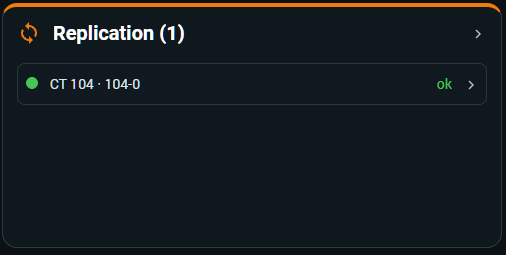
The screenshot is a historical example from a cluster configuration with active replication. It shows one configured replication job for CT 104 with status ok.
When replication is used in an environment, Replication Status can be particularly useful for notifications because a change from the normal state can draw attention to a problem without requiring continuous inspection of the Proxmox replication interface.
Firewall state
Cluster monitoring can expose the state of the Proxmox firewall configuration available through the cluster.
This provides a simple diagnostic indicator in Home Assistant.
It should not be treated as a replacement for reviewing firewall rules in Proxmox VE.
The sensor indicates the relevant state reported by Proxmox; firewall rules and security policy remain configured and managed in Proxmox.
Notifications and automation
Failed tasks, replication problems and other cluster-state changes can be useful notification signals because many important Proxmox operations normally complete without requiring manual attention.
Home Assistant can surface an unexpected condition instead of requiring the administrator to repeatedly inspect the Proxmox interfaces.
As with other alerts, automation should provide enough context to identify what needs investigation rather than simply repeating that a counter or state changed.
For the complete list of task, replication and diagnostic Cluster entities, see Reference.
↑ Back to topBackup Health
Cluster backup monitoring provides a PVE-side view of configured backup jobs and whether expected backups are being created successfully.
This complements PBS monitoring, which focuses on the backup server and the backup data stored there.
Backup Jobs
The Backup Jobs information summarizes the backup jobs configured in the Proxmox environment.
This allows Home Assistant to understand that backup schedules exist and provide a cluster-level view of their current operational state.
The exact information available depends on the backup jobs configured in Proxmox.
Backup Age
A backup can exist and still be too old for the protection policy you expect.
Backup Age monitoring focuses on how long it has been since the relevant successful backup information was recorded.
This is often more useful than simply asking whether a backup exists.
A workload that normally receives a daily backup deserves attention if its most recent successful backup becomes several days old even though older backups remain available.
Backup Health
Backup Health combines the available backup information into a higher-level operational view.
Its purpose is to make it easier to identify backup situations that require attention without relying on a single raw value.
It should still be interpreted together with Backup Jobs and Backup Age when diagnosing a problem.
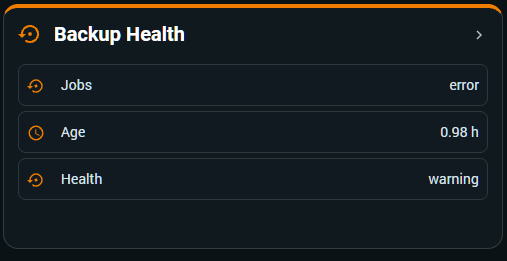
This example shows:
- Jobs → error
- a recent Backup Age;
- Health → warning.
PVE and PBS remain complementary
Cluster Backup Health describes the PVE side of the backup workflow.
PBS monitoring describes the backup server, its datastores, stored backups, verification and maintenance operations.
These two views can legitimately report different states.
For example:
- PBS contains healthy, previously verified backups.
- A new scheduled PVE backup begins.
- The upload or backup task fails before a valid new backup is completed.
- Cluster backup monitoring can identify the failed or ageing PVE-side backup situation.
- PBS can still report that the backups already stored in its datastore are healthy.
There is no contradiction.
The two systems are describing different stages of the backup process.
Use age as an operational signal
Backup failures are not the only reason an expected recent backup may be missing.
A job may not have run, a workload may have been unavailable or another operational condition may have prevented the expected backup.
Monitoring age helps detect the outcome that matters:
Is the latest successful backup still recent enough?
This makes Backup Age particularly useful for Home Assistant notifications.
Avoid relying on a single backup indicator
A robust backup overview can combine:
- configured Backup Jobs;
- Backup Age;
- Backup Health;
- failed cluster tasks;
- PBS datastore information;
- PBS verification status.
Each answers a different question.
Together they provide a much more complete view of the backup environment.
For the complete list of Cluster backup entities, see Reference.
↑ Back to topTroubleshooting
Cluster monitoring depends on Proxmox cluster information being available through the configured connection and permissions.
When something looks wrong, first determine whether the problem affects the entire cluster view or only one category such as nodes, HA, tasks, replication or backup monitoring.
Cluster information does not appear
Confirm that the configured Proxmox environment is actually operating as a cluster and that the account used by Proxmox Extended Sensors can access the required cluster information.
Also verify that the relevant Cluster connection or configuration has been created in the integration.
If normal PVE monitoring works but Cluster information does not, permissions and cluster-specific API access are useful first checks.
Cluster reports no quorum
A no quorum state comes from the cluster information reported by Proxmox.
Check the cluster directly in Proxmox VE.
Review:
- expected nodes;
- node availability;
- cluster communication;
- current voting/quorum state.
Home Assistant should be used to surface the condition, while diagnosis and recovery of the Proxmox cluster itself should be performed using the appropriate Proxmox administration tools.
A node appears offline
Check whether the node is reachable and whether Proxmox itself reports it as online.
Remember that node availability and quorum are related but not identical.
A node being offline does not automatically mean the cluster has lost quorum.
Check both values before interpreting the overall cluster state.
Aggregate resources look unexpected
Cluster CPU, RAM and storage are aggregated values.
They do not necessarily match the arithmetic average of the percentages shown for individual nodes.
Different nodes can have different CPU, memory and storage capacities.
Use the per-node information and the corresponding PVE monitoring when investigating an unexpected aggregate value.
VM or CT counts look different from detailed monitoring
Cluster guest summaries describe workloads known across the cluster.
Detailed PVE guest monitoring only exposes the guests selected for individual Home Assistant monitoring.
The two counts therefore do not need to match the number of detailed guest devices or entities in Home Assistant.
HA information is unavailable
Confirm that High Availability is actually configured in the Proxmox cluster.
If HA is not used, unavailable or limited HA information can be expected.
If HA is configured but the information is unexpectedly missing, check cluster quorum, Proxmox HA status and the permissions available to the integration.
Failed Tasks is not zero
A non-zero Failed Tasks state means that recent Proxmox task information contains unsuccessful operations.
Inspect the entity attributes for additional context about the latest recorded failure.
Depending on the information available, these can identify:
- when the latest failure occurred;
- the associated node;
- the task type;
- available task status information.
The counter alone does not identify the root cause and the attributes do not represent a complete history of every failure.
Use the available context to identify the relevant task and investigate it in Proxmox when necessary.
Replication reports a problem
If Replication Status reports a problem, check the replication jobs directly in Proxmox VE.
The entity attributes can provide additional context, including:
- failed jobs;
- whether inventory information is current;
- whether runtime information is current;
- whether any jobs have an unknown runtime state.
Use this information to identify that replication requires attention, then use the Proxmox replication interface and task information to diagnose the underlying cause.
Replication jobs are configured and managed in Proxmox, not by Home Assistant.
A backup failed but PBS reports healthy backups
This can be expected.
Cluster backup/task monitoring represents the PVE side of the operation.
PBS reports the state of backup data available on the backup server.
If a new backup fails before completion, previously stored PBS backups can remain completely healthy.
Use the Cluster/PVE task information to diagnose the failed job and PBS monitoring to evaluate the backups actually stored on the server.
Backup Age becomes high
First confirm whether the expected backup job has recently completed successfully.
Check:
- configured backup schedule;
- recent PVE tasks;
- guest availability;
- backup destination;
- any relevant failure messages.
Backup Age identifies that a sufficiently recent successful backup may be missing; it does not by itself identify why.
Firewall information looks wrong
Confirm the firewall state directly in Proxmox VE.
The integration reports the cluster information available through Proxmox but does not replace inspection of firewall configuration or rules.
Check Home Assistant logs
When the cause is not obvious, open:
Settings → System → Logs
Look for entries related to Proxmox Extended Sensors around the time the cluster problem occurred.
Remove credentials, API Token secrets and other sensitive information before sharing logs publicly.
Before opening an issue
Try to determine whether the problem affects:
- the complete Cluster connection;
- quorum;
- node availability;
- aggregated resources;
- VM or CT summaries;
- HA;
- failed tasks;
- replication;
- firewall information;
- Backup Jobs;
- Backup Age;
- or Backup Health.
Include the relevant Proxmox Extended Sensors version, Home Assistant version and Proxmox VE version when reporting a reproducible problem.
For cluster-specific issues, include the number of nodes and enough non-sensitive information about the cluster topology to understand the scenario.
Never include passwords or API Token secrets.
If the problem persists after these checks, use the project's GitHub issue tracker.
↑ Back to top